
How to use your debt payoff tracker
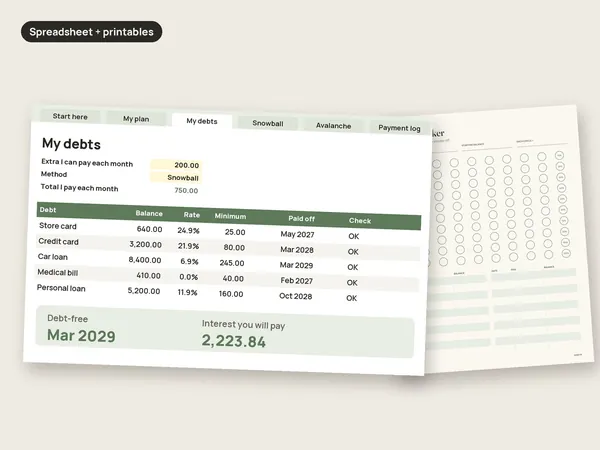
- Open the spreadsheet in Excel, or upload it to Google Sheets, and go to My debts.
- List your debts in the yellow cells: balance today, interest rate and minimum payment, then the extra you can pay each month.
- Pick snowball or avalanche. My plan shows your debt-free date and the interest, and compares both methods.
- Pay what the plan says each month, log it, and colour in the printable tracker.
What is inside
- My debts: up to 12 debts, with the month and date each is paid off and the interest it costs.
- My plan: debt-free date, total interest, snowball vs avalanche, a balance chart and a progress bar.
- Snowball and Avalanche: what to pay on each debt, month by month, for up to 30 years.
- Payment log: record what you pay and watch the progress bar fill.
- Printables (US Letter and A4): debt list, payoff order, colour-in trackers with 100 circles, a total-debt thermometer, a monthly payment log, find extra money and paid-off stamps.
Planning the rest of life too? See the undated ADHD planner and the 2027 digital planners.
Guide: Debt snowball vs debt avalanche: which should you use?
Questions
What is the debt snowball method?
Pay the minimum on every debt and put all your extra money on the smallest balance. When it is paid off, its payment rolls on to the next smallest. You see debts disappear sooner, which helps many people keep going.
What is the debt avalanche method?
The same, but the extra goes to the debt with the highest interest rate first. It usually costs less interest. The spreadsheet shows both side by side, with the months and the interest for each, so you can choose.
Does it work in Google Sheets?
Yes. Upload the file to Google Drive and open it with Google Sheets. It also works in Microsoft Excel and Apple Numbers. There are no macros or add-ons.
Which currency does it use?
Any. The sheet shows plain numbers without a currency symbol, so it works in dollars, pounds, euros or anything else.
How exact is the plan?
Interest is worked out monthly from the yearly rate (rate ÷ 12), which is how most cards and loans are explained. Your lender may calculate daily, so their figures can differ by a little. Update the balances now and then to keep the plan on track.
Is this financial advice?
No. It is a planning tool that does the arithmetic for the numbers you enter. For advice on your situation, talk to a qualified adviser or a free debt charity.